In this article I want to talk about my experience handling Socket.io (Websocket) with a distributed system. So back in the days, when I was working at a telemedicine startup company, at that time our app had consultation feature where if a patient wanted to talk to a doctor, our app would just redirect them to our official number on WhatsApp.
After patients finished talking with doctor, the doctor had to manually inform the pharmacist to prepare the medicine, After that the pharmacist would manually input everything from the prescription details to the patient's data into our internal dashboard.
We realized we needed a fully integrated system. So our PM came with this new business flow :
- A patient chats from the app
- Doctor replies from a dashboard
- Pharmacist gets a real-time notification as soon as the prescription is ready.
And at that time, for the tech stacks we used Socket.io, Nest.Js, and MongoDB to store conversation data and since we were microservices-oriented, we built a new service called chat-service that integrated with Kafka to communicate with user-service
The architecture looked something like this:
- chat-service: Handles WebSocket connections and real-time messaging
- user-service: Manages user authentication and profiles
- notification-service: Sends push notifications to pharmacists, users, and doctors
- Kafka: Event bus for inter-service communication
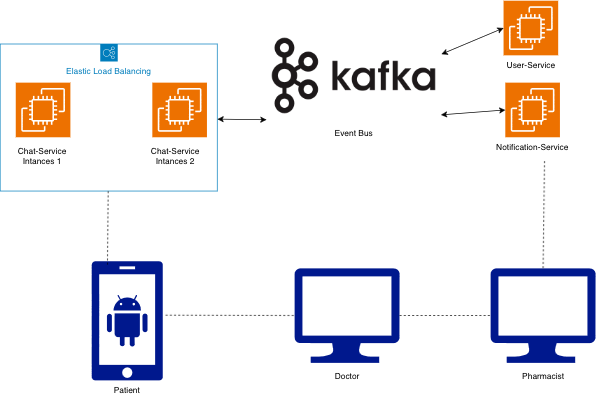
As you can see on that diagram we used load balancer for distributed traffic, Keep this in mind this is where things went wrong.
After our PM defined all the requirements, we started developing this new feature and deployed to dev and staging environments, nothing went wrong during testing even our QA Engineer didn't find any issue in this new feature. However everything went wrong when it running on production
Two days after our chat feature running live on production, we started receiving reports from our customer service team and some doctors, they were facing same issues, So when patients or doctors tried to chat each others, some messages weren't being received.
So, my team and I immediately tried to reproduce the issue in the staging environment. It's so weird, everything worked perfectly there. We couldn't replicate the message loss no matter how hard we tried.
Desperate cause we didn't find any issue, we decided tried to debug in production (using special test accounts), We tried to reproduce the issue and kept an eye on the Grafana logs while simulating a chat session.
After that we found the root cause, We noticed that during the initial connection (handshake), the WebSocket was assigned a specific Session ID. But here's the weird part, when we sent a second or third message, the logs would show a completely different Session ID. Sometimes the server just straight up rejected it with "Session not found."
Turns out, we had multiple instances running in production. The load balancer was doing its job Round-Robin distribution across servers. Which meant:
- Request 1 (Handshake) went to Instance A.
- Request 2 (Send Message) went to Instance B.
Instance B had zero clue who this user was. The session data? Still sitting in Instance A's memory. We also realized a mistake in our infrastructure setup, Staging only had one instance, while production had multiple. That's why we never saw this coming during testing.
To solve this, we didn't need to rewrite the whole service. We just needed the instances to talk to each other. Enter Redis Pub/Sub with the socket.io-redis adapter.
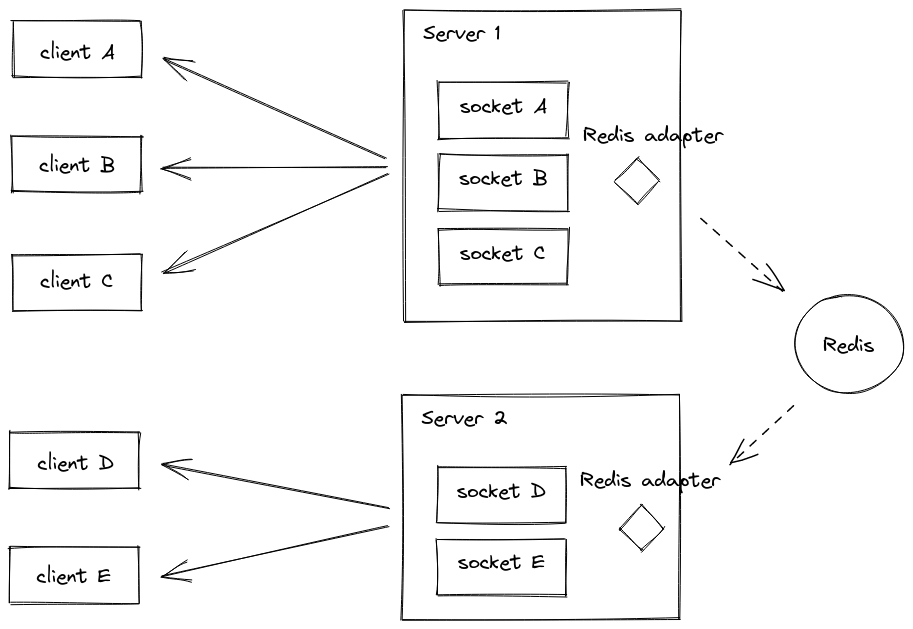
Here's how it works: instead of each instance keeping its own socket connections, the adapter pushes everything to Redis. Redis then broadcasts to all instances. User on Instance A can now chat with someone on Instance B.
Believe it or not, the fix was literally just adding a few lines of code to configure the adapter in our main.ts:
import { NestFactory } from "@nestjs/core";
import { DocumentBuilder, SwaggerModule } from "@nestjs/swagger";
import { AppModule } from "./app.module";
import { ValidationPipe, VersioningType } from "@nestjs/common";
import { PrismaService } from "@modules/prisma/prisma.service";
import tracing from "@src/tracing";
import { RedisIoAdapter } from "./libs/adapter/socket-redis.adapter";

async function bootstrap() {
  const app = await NestFactory.create(AppModule);

  await tracing.start();

  // ... (Standard NestJS setup like CORS, Versioning, Prisma)

  // THE FIX: Adding Redis Adapter
  const redisIoAdapter = new RedisIoAdapter(app);
  await redisIoAdapter.connectToRedis();

  app.useWebSocketAdapter(redisIoAdapter);

  await app.listen(process.env.APP_PORT, "0.0.0.0");
}

bootstrap().then(() =>
  console.log(`Server is running at port ${process.env.APP_PORT}`),
);
Conclusion
And just like that, the issue was resolved. The intermittent message loss stopped, and our new chat feature was finally working for our patients and doctors.
Looking back, the real lesson here wasn't about Redis or Socket.io, it was simpler than that. Your staging environment needs to match production. It’s easy to overlook the differences between staging and production (like the number of instances), but as we learned the hard way, those "minor" differences can hide critical bugs that only show up when real users are involved.
So, if you're building a real-time feature in a microservices architecture, always remember:
- WebSockets are stateful. You can't just scale them horizontally like a REST API without a strategy to share that state (like Redis Pub/Sub).
- Make your staging environment as close to Production as possible. If Prod has a load balancer and multiple instances, Staging should too.